Bring Your Creations to Life with the Typograph Font
I was in the middle of designing a set of candle labels for my small handmade shop when I stumbled upon the Typograph font. It felt like the perfect match for the warm, personal vibe I wanted to convey. With its soft curves and gentle strokes, it immediately reminded me of the handwritten notes I used to write as a child—simple, heartfelt, and full of charm.
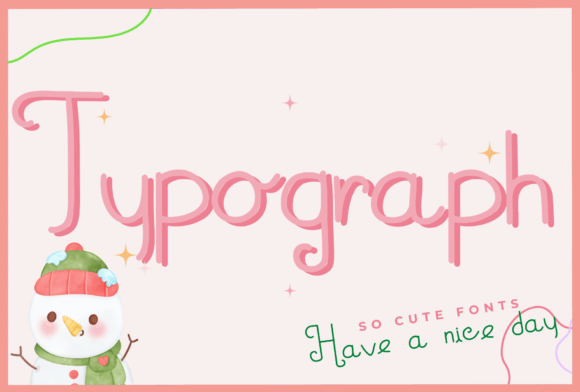
The Typograph is a script font that feels both elegant and approachable. It’s not too ornate, so it doesn’t overpower your design, but it has just enough character to make your text stand out. I found myself using it on everything from greeting cards to boutique packaging. Its visual personality brings a sense of creativity and warmth to any project, making it ideal for handmade items that tell a story.
Typography That Feels Like a Personal Touch
One of the first things I noticed about Typograph was how well it worked for short phrases and names. I used it for a line of birthday invitations, where it added a playful yet refined touch. The font's style makes it great for display use, whether you're creating product labels, signage, or even digital printables.
I tested it on a series of seasonal tags for my holiday collection. The way it flowed across the paper made each tag feel like a hand-written message, which resonated well with my customers. It's this kind of emotional appeal that can really elevate your brand and create a stronger connection with your audience.
Practical Uses for Typograph in Handmade Projects
Typograph has become a staple in my creative toolkit. Here are some of the ways I've used it:
- Candle Labels: I paired it with a clean sans serif font for the product details, allowing Typograph to take center stage for the candle names.
- Greeting Cards: It adds a personal flair to the front of my cards, especially for special occasions like weddings and birthdays.
- Boutique Packaging: I used it on custom gift boxes and wrapping paper, giving them a unique, artisanal feel.
- Digital Printables: For my online shop, I created printable wall art using Typograph, and it looked amazing in both mockups and final prints.
Its versatility makes it suitable for a wide range of projects. Whether I'm working on physical products or digital assets, Typograph helps maintain a consistent brand identity while keeping things visually engaging.
Design Tips for Using Typograph
When using Typograph, I’ve learned a few tips that help ensure the best results. First, it's important to consider readability, especially for smaller text sizes or when using it on stickers or product labels. I often test it on different materials and scales before finalizing a design.
For cutting machines like Cricut or Silhouette, I recommend checking the font's file formats and ensuring that it includes all necessary alternates and ligatures. This helps avoid any issues during the cutting process and ensures that the final product looks polished.
Font pairing is another key aspect. I often pair Typograph with a simple sans serif font for body text, which keeps the design balanced and easy to read. It also works beautifully with other script fonts if I want to add more texture to a layout.
Choosing the Right Style for Your Project
Before using Typograph for commercial purposes, I always check the available styles, weights, and multilingual support. It's crucial to confirm that the font license allows for the type of use you have in mind, whether it's for physical products, templates, or digital downloads.
I also look at the included glyphs and swashes to see if they fit the tone of my project. Sometimes, a subtle variation can make all the difference in how the font is perceived by your audience.
Whether you're a hobbyist, an Etsy seller, or a professional designer, Typograph offers a creative solution that blends simplicity with style. It's a font that feels like a natural extension of your craft, helping you bring your vision to life with every label, card, and package you create.